If you’ve spent any time building a smart home over the past few years, you already know the frustration of traditional PIR (Passive Infrared) motion sensors. You walk into your HDB bathroom, the lights turn on instantly. Great. But two minutes later, while you’re sitting still on the toilet, the lights abruptly shut off, leaving you waving your arms in the dark like a lunatic just to get the sensor to notice you again.
Then came mmWave (millimeter-wave) radar presence sensors. These devices detect the minute micro-movements of human breathing, meaning the lights stay on as long as you are physically in the room. They completely revolutionized presence detection.
But they brought a massive new headache, especially for us living in Singapore: Wires.
Because mmWave radar requires continuous, relatively high power, early models like the excellent Aqara FP2 require a permanent USB power source. In an American timber-frame home, you just fish a wire behind the drywall. But in a Singaporean HDB flat or condo built with solid reinforced concrete? You are stuck running ugly PVC cable trunking up your walls, ruining your meticulously planned interior design.
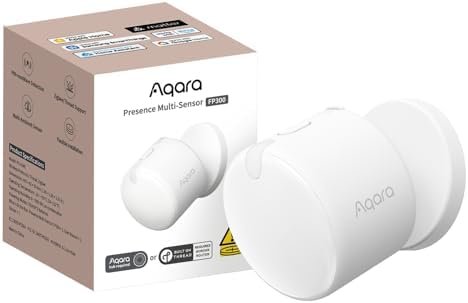
Now, in 2026, Aqara has finally released the Aqara FP300, a battery-powered mmWave presence sensor utilizing Matter-over-Thread. It promises the holy grail: true mmWave presence detection without the wires.
But is it actually better than the reigning champion, the FP2? Let’s break down the true capabilities, limitations, and trade-offs of the Aqara FP300 vs FP2 for Singapore homes.
The Concrete Reality: Why Wireless Matters in Singapore
Before we dive into the specs, we have to talk about local context. Anyone looking for smart home solutions Singapore eventually hits the “concrete wall” problem.
Our walls are solid. Channelling concrete to hide wires is expensive, messy, and typically only allowed during major renovations (and even then, strictly regulated by HDB/BCA to prevent structural damage). If you decide you want an FP2 in the corner of your living room after your renovation is done, you have two choices: let a USB cable dangle to the nearest socket, or stick PVC trunking along your skirting boards and up your wall.
This is why the Aqara FP300 is generating so much hype. It completely eliminates the Wife Acceptance Factor (WAF) penalty of mmWave sensors. You can mount it magnetically or with 3M tape in the optimal corner of your ceiling or wall, and you’re done. No wires. No trunking. No arguments.
Aqara FP2: The Wired Powerhouse
To understand what the FP300 is up against, we need to respect the incumbent. The Aqara FP2 (currently retailing around SGD $129 - $149 locally) is a beast of a sensor.
Key Specs of the FP2:
- Protocol: Wi-Fi (2.4GHz) & Bluetooth
- Power: Wired (USB-C, continuous 5V/1A)
- Technology: 60GHz mmWave radar
- Key Features: Multi-zone positioning (up to 30 zones), fall detection, sleep tracking
- Ecosystems: Apple Home, Alexa, Google Home, Home Assistant, SmartThings
Because it has a continuous power supply, the FP2 doesn’t have to sleep. It constantly blasts its 60GHz radar into the room. This allows for an incredible feature: Zone Positioning.
You can set up an invisible grid in your living room and tell your smart home: “If someone is in the ‘Sofa’ zone, turn on the reading lamp. If someone moves to the ‘Dining Table’ zone, turn on the dining pendant lights.” It acts as multiple sensors in one.
The downside? Aside from the aforementioned wires, the FP2 uses Wi-Fi. While Aqara’s Wi-Fi implementation is generally stable, having 5 to 10 of these around your house adds significant overhead to your wireless router. If your mesh network drops, your lights stop working.
Aqara FP300: The Battery-Powered Savior
The newly released Aqara FP300 (expected local retail SGD $139 - $159) takes a completely different approach.
Key Specs of the FP300:
- Protocol: Matter-over-Thread / Zigbee (selectable)
- Power: Battery (CR2450 coin cells, claimed up to 3-year life)
- Technology: Hybrid PIR & 60GHz mmWave radar
- Key Features: Wireless mounting, magnetic base, local processing via Thread
- Ecosystems: Any Matter-enabled ecosystem (Apple Home, SmartThings, Home Assistant)
How Does It Survive on Batteries?
The biggest question in smart home circles has been: How did Aqara get a power-hungry mmWave sensor to run on CR2450 batteries for three years?
The answer is clever hybrid engineering. The FP300 utilizes an ultra-low-power PIR sensor to detect initial, gross movement. When the PIR is triggered (i.e., you walk into the room), it instantly wakes up the 60GHz mmWave radar. The radar then takes over, verifying your continued presence through micro-movements (like breathing or typing). When the radar determines the room is empty, it shuts down, handing sentinel duty back to the low-power PIR.
This “wake-on-motion” technique saves massive amounts of energy while delivering the core benefit of mmWave: never leaving you in the dark while you’re sitting still.
Head-to-Head: Which Should You Buy?
Choosing between the FP2 and FP300 isn’t just about “wired vs. wireless.” It dictates how your smart home operates at a foundational level. Let’s look at the critical trade-offs.
1. Detection Latency & Automation Speed
Winner: Aqara FP2
When you walk into a dark HDB bathroom at 2 AM, you want the lights on instantly.
Because the FP2 is wired and constantly active, its reaction time is near zero. The moment you cross its threshold, the Wi-Fi signal hits your hub, and the lights are on before your foot hits the floor.
The FP300, due to its battery-saving design, has a tiny inherent latency. The PIR has to detect you, wake the device from its Thread sleep state, and transmit the signal. We are talking about a delay of perhaps 0.5 to 0.8 seconds. In the grand scheme of things, it’s fast. But in a rapid lighting automation—like walking down a short HDB hallway—you might find you’ve taken two steps into the dark before the lights illuminate. If you pair this with smart switches, you’ll want to ensure you have the fastest possible setup. (Check out our guide on The Best Matter-over-Thread Smart Switches for Singapore HDBs in 2026 to optimize this pipeline).
2. Multi-Zone Tracking vs. Single Area Presence
Winner: Aqara FP2
The FP300 is a binary sensor: it tells you if someone is in the room.
The FP2 tells you where someone is in the room. If you want advanced automations—like turning on the TV backlighting only when someone sits on the left side of the sofa, or turning off the study room lights when you move from the desk to the reading chair—the FP2 is the only choice.
3. Aesthetics & Installation
Winner: Aqara FP300
This is the FP300’s trump card. It comes with a beautiful magnetic mount that can be angled perfectly. You can slap the 3M adhesive onto your BTO flat’s bomb shelter door, your tiled bathroom wall, or your concrete ceiling in 10 seconds. No drills, no USB cables, no ugly white trunking running down your designer wallpaper.
4. Smart Home Protocols (Thread vs. Wi-Fi)
Winner: Aqara FP300
In 2026, we are heavily pushing local, mesh-based protocols over Wi-Fi for smart home sensors.
The FP300 utilizes Matter-over-Thread, meaning it doesn’t clutter your Wi-Fi router. It routes its signals through your existing Thread Border Routers (like an Apple HomePod Mini, Google Nest Hub, or a dedicated Aqara Hub M3). Because Thread is a self-healing mesh network, the more Thread devices you have, the stronger your network gets.
Note: To understand the nuances of local control hubs, read our deep dive: Aqara Hub M3 vs. Home Assistant Green: Which Local-First Controller is Best for Singapore HDBs in 2026? [B].
Real-World HDB Deployment Strategies
So, how should you actually use these in a typical 4-Room or 5-Room HDB flat? The answer is usually a mix of both.
Where to use the Aqara FP2 (Wired):
- The Living Room: This is typically where your TV console and existing power sockets are. You can easily hide the wire behind a curtain or near the TV console. The multi-zone tracking is invaluable here for creating “Sofa,” “Dining,” and “Walkway” zones.
- The Master Bedroom: If you want to use the FP2’s built-in sleep tracking or fall detection features, it needs continuous power. Mount it on a bedside table or low on the wall where a cable can be hidden behind the bed frame.
Where to use the Aqara FP300 (Wireless):
- Bathrooms: Singapore HDB bathrooms are notoriously difficult to wire. You rarely have power sockets in the optimal ceiling corners. Stick an FP300 near the shower screen to ensure the lights stay on while you bathe.
- Kitchens: If your kitchen is fully tiled and carpentry is complete, routing wires is a nightmare. The FP300 is perfect for detecting presence while you’re quietly chopping vegetables at the counter.
- Hallways & Walk-in Wardrobes: These are transit areas where you just need reliable “someone is here” detection without the fuss of trunking.
The Home Assistant and Apple Home Integration
For the power users running Home Assistant or strictly Apple Home, both sensors integrate beautifully, but with different quirks.
The FP2 relies on the HomeKit controller integration in Home Assistant. It works locally and is incredibly fast, exposing all of its separate presence zones as individual motion sensors. However, setup can sometimes be finicky if your mDNS (multicast DNS) settings on your router aren’t configured perfectly.
The FP300, being a Matter device, connects directly to your preferred platform using standard Matter protocols. Whether you add it via an Aqara Hub bridging to HomeKit, or directly to Home Assistant via a Thread Border Router, the process is largely plug-and-play. If you’re still confused about standards, check out our guide: Thread vs Matter: Which Smart Home Standard Should Singapore Homeowners Choose in 2026?.
Final Verdict
Are battery-powered mmWave sensors finally ready for the mainstream? Yes. The Aqara FP300 is an engineering marvel that solves the single biggest complaint about modern smart home presence detection: the cables.
If you live in a Singapore HDB or Condo with finished concrete walls and you refuse to use cable trunking, the FP300 is your undisputed champion. The minor trade-off in initial detection latency (less than a second) is well worth the clean, wire-free aesthetic and the 3-year CR2450 battery life.
However, do not throw away your Aqara FP2s just yet. For complex, open-concept living spaces where multi-zone tracking is required to trigger different scenes based on where you are sitting, the continuously powered, Wi-Fi-based FP2 remains in a league of its own.
Your best bet in 2026? Buy the FP2 for your living room, and deploy the FP300 everywhere else.