Outdoor Cameras in Singapore Are a Different Beast
A friend in Serangoon Gardens texted me last month: “Bro, my front gate cam keeps dropping. Already changed router twice.” It’s the same complaint I hear from condo owners trying to monitor a balcony, and from landed-home folks watching a driveway. Outdoor security in Singapore isn’t really a hardware problem — it’s a tropical, low-infrastructure, no-power-outlet problem.
The good news is that in 2026, the outdoor-camera category has finally caught up. Dual-lens 4K sensors, on-device AI, real solar panels (not toys), Matter and Thread on the same unit — these are no longer flagship-only features. The bad news is that most reviewer lists are written for American houses with garage outlets and front porches. Singapore is different. So here’s what’s actually worth buying in 2026 for HDB corridors, condo balconies, and landed-home perimeters.
I’ve narrowed this to four cameras: the Reolink Argus 4 Pro, the eufy SoloCam S340, the Aqara Camera Hub G5 Pro, and the TP-Link Tapo C460. Each one wins in a specific situation. None of them is the right answer for everyone.
What Actually Matters in a Tropical Climate
Before I get into the picks, a few criteria that matter more here than in temperate countries.
IP65 minimum, IP66 preferred. Singapore rain is not a drizzle. A camera mounted under a corridor eave still gets sideways rain during a Sumatra squall, and any camera you put on a landed-home gate post is going to get hosed by your gardener once a fortnight. IP65 keeps out dust and low-pressure jets; IP66 handles the heavier stuff. Both are fine. IP54 is not.
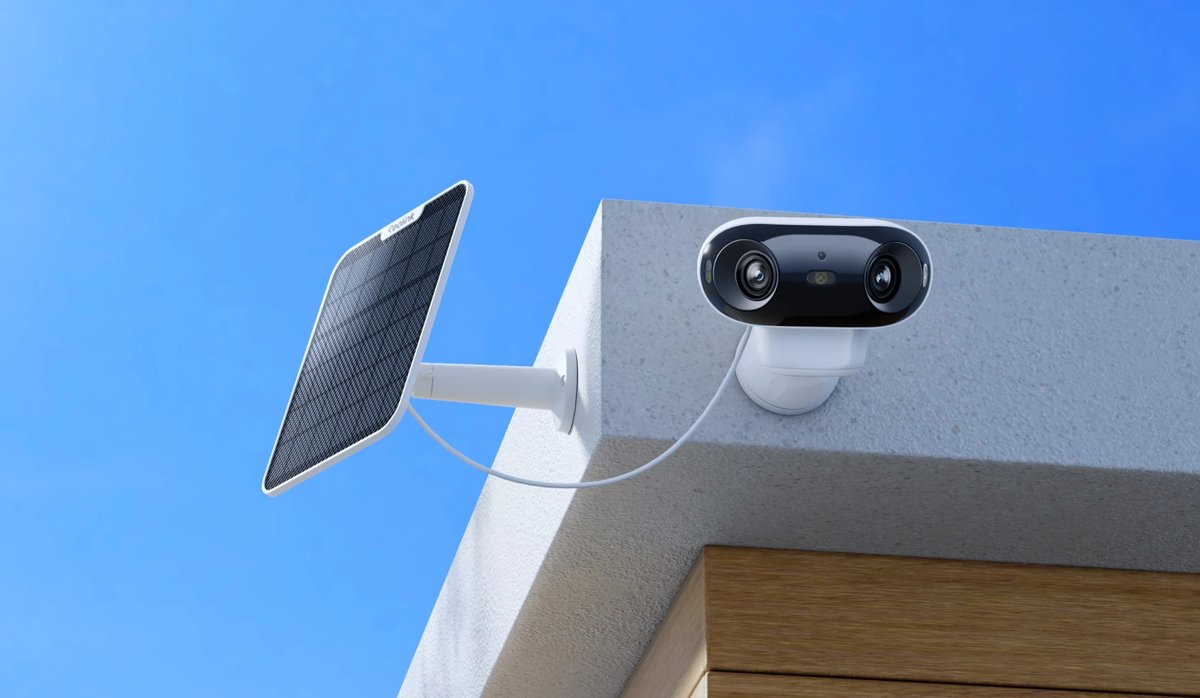
Solar or battery — not just “wireless.” Half the homes I work in don’t have a powered outlet near the gate or the balcony. A “wireless” Wi-Fi camera that still needs a USB-C cable to a wall is a fake solution. You want a real swappable battery, or a properly sized solar panel (6W minimum, ideally with a 2m+ cable so you can angle the panel toward the sun and hide the camera in shade).
Local storage and no mandatory subscription. Singapore buyers hate recurring fees more than most markets, and most outdoor cameras don’t actually need the cloud for AI any more — the chips do it on-device. Look for microSD slots, internal eMMC, or a base station with a hard drive. Skip anything that locks event recording behind a monthly plan.
Protocol compatibility. This is where Matter changed things in 2025. If you already run Apple Home, Google Home, or SmartThings, pick a camera that exposes itself natively, not via a janky cloud bridge. Matter 1.5 added a camera spec but adoption is still uneven — HomeKit Secure Video remains the most polished way to handle Apple Home, while Tapo and Reolink generally hit Google and Alexa first.
Wi-Fi 6 (and 5GHz at minimum). A Wi-Fi 5 camera streaming 4K through two concrete HDB walls is going to choke. Wi-Fi 6 with 5GHz support helps, but honestly the bigger win is having a mesh or extender within line-of-sight of the camera. If you’ve already read our guide to Wi-Fi 7 routers with built-in Thread border routers, you know what I’m going to say.
OK, onto the cameras.
Reolink Argus 4 Pro — The 4K All-Rounder
If you only read one section, read this one. The Reolink Argus 4 Pro is the most camera you can buy for the money in 2026, full stop.
Twin 4mm lenses stitch into a real 180-degree 4K view (5140 × 1440 panoramic). The ColorX night vision is the trick that sells the whole unit — an f/1.0 aperture with a 1/1.8" sensor pulls in enough ambient light that you get full-colour footage well past midnight without needing a spotlight burning into your neighbour’s window. For a corner-mounted unit covering a driveway or the full length of an HDB corridor, that 180-degree blind-spot-free coverage means you don’t need two cameras.
The Argus 4 Pro is dual-band Wi-Fi 6, IP66, and supports up to a 512GB microSD card on-device — no subscription, ever. AI detection for people, vehicles, and animals runs locally on the camera. The included solar panel is genuinely useful in Singapore: I’ve had a sister unit on a balcony in Toa Payoh running for nine months without a charge.
What you give up: no Matter, no HomeKit. Reolink ties into Google Home and Alexa for voice control, and it has its own app and a free desktop client that’s actually pretty good. If you’re a deep Apple Home user, this isn’t the right camera. For everyone else, it’s the default pick.
Singapore availability: Available locally via the Reolink SG storefront, where it’s currently listed at S$259 (down from S$399). Kaira Global also carries it.
eufy SoloCam S340 — The Pan-Tilt Solar Specialist
This is the camera I install when someone wants to cover a wide area from a single mounting point. The eufy SoloCam S340 uses a dual-camera setup (3K wide-angle plus a 2K telephoto) on a 360-degree pan-and-tilt motor head. The trick is that the wide lens detects motion, then the telephoto auto-zooms and tracks the subject — up to 8x hybrid zoom — so you actually see faces and number plates, not blurry blobs.
The solar panel is the other half of the story. eufy claims two hours of direct sunlight per day is enough to keep the battery topped up, and with Singapore’s near-equatorial UV index, that’s not optimistic. I’ve had S340 units survive the wettest weeks of the inter-monsoon period without dropping below 60% battery.
Like the Reolink, there’s no monthly fee. The camera has internal storage built in, and if you want more, the S340 plays with eufy’s HomeBase 3 for centralised recording. Where eufy shines over Reolink is the app — eufy’s UI is genuinely the most polished of any non-Apple, non-Google system I use. Where it falls short is ecosystem: it talks to Alexa and Google Home, but Apple Home integration is via a HomeKit bridge on the HomeBase, not on the camera itself.
Singapore availability: Direct from eufy SG. Single-camera kits run roughly S$330–380; the 4-pack drops the per-unit cost significantly if you’re doing a landed-home perimeter.
Aqara Camera Hub G5 Pro — The HomeKit + Matter Power Move
This is the one I install in Apple-first households, and increasingly in any household serious about Matter. The Aqara Camera Hub G5 Pro is two devices in one chassis: a proper 4MP outdoor camera with HomeKit Secure Video, and a Thread border router plus Zigbee hub plus Matter controller. So one device at your gate post is also extending Thread reach to your outdoor Aqara sensors and pulling double duty as a HomeKit hub.
The sensor is a graphene-cooled 1/1.8" unit with an f/1.0 aperture, delivering 2.6K resolution and what Aqara calls True Color Night Vision. The spec sheet sounds like marketing, but in practice it’s competitive with the Reolink ColorX — they’re both using the “big aperture plus ambient light” trick. IP65 rated, with operating temperatures rated all the way down to -30°C (irrelevant here, but speaks to build quality).
There are two variants: a Wi-Fi version and a PoE version. For landed homes with a structured cabling closet, the PoE version is the right call — you get a single-cable install with no battery to ever swap. The Wi-Fi version works fine if your access point is within range.
The catch: internal storage is limited and non-upgradeable. You’re meant to record to HomeKit Secure Video via iCloud, to a NAS, or to a microSD-loaded Aqara hub elsewhere on the network. That’s fine if you’re already paying for iCloud+, but it’s a real limitation if you wanted truly local-only retention without a separate NAS. Also worth flagging: the G5 Pro’s Macstories review calls out that the HomeKit integration is best-in-class but the Aqara Home app itself can be sluggish when reviewing recorded clips.
Singapore availability: Sold through Aqara’s local channels including the PFE Tech Aqara store and HomeSmart Singapore. Pricing runs S$339–369 depending on colour and Wi-Fi vs PoE.
TP-Link Tapo C460 — The Budget Battery Pick
Not everyone needs flagship hardware. If you want a competent 4K outdoor camera that works out of the box for under S$200, the Tapo C460 is the one.
It’s a battery-powered 4K Wi-Fi cam with a 10,000mAh cell that Tapo claims will run 200 days between charges. That’s probably optimistic if you have heavy motion traffic, but I’ve seen real-world deployments go four to five months easily on default settings. Starlight sensor plus integrated spotlights give you full-colour night vision with the spotlight on. Magnetic base makes mounting trivial — handy for HDB corridors where you might not want to drill into shared structure.
It’s not as feature-dense as the others: 4K resolution is fixed (no dual-lens trickery), there’s no Matter, no Thread, no HomeKit. But it talks fluently to Google Home and Alexa, the Tapo app is reliable, and a microSD slot keeps storage local with no subscription. There’s also a solar-panel kit if you want to install-and-forget.
Singapore availability: Challenger carries the camera-only version at around S$155 and the solar kit around S$175. Lazada and Shopee occasionally undercut these during sales.
Quick Picks by Situation
- HDB corridor cam (covering main door + lift lobby): Tapo C460. Magnetic mount, no drilling, cheap enough to replace if neighbours complain. Apple Home users may prefer an indoor Aqara camera instead.
- Condo balcony watching the parking lot 12 floors down: eufy SoloCam S340. Pan-tilt plus 8x zoom turns a single mount into full-coverage surveillance.
- Landed-home front gate plus driveway: Reolink Argus 4 Pro. The 180-degree view eliminates the corner blind spot most single-lens cams create.
- Landed-home perimeter, multiple cams, deep Apple Home household: Aqara G5 Pro on PoE. The Thread border router doubles as your outdoor sensor backbone.
- Renting a condo, can’t drill, no router upgrade budget: Tapo C460. Magnetic, battery, plug-and-play.
Singapore-Specific Setup Tips
A few things I’ve learned the hard way installing these in tropical conditions.
Position the solar panel, not the camera, for sun. Most installs fail because the user mounted the camera in a shaded spot (good for the lens, bad for thermal) and then mounted the panel next to it. Get a model with a 2m+ panel cable and angle the panel separately. Singapore’s near-equatorial latitude means a panel facing roughly upward works year-round.
Mind the HDB rules. Town councils generally allow corridor cameras pointed at your own unit door, but cameras that capture neighbour doors or common areas can attract complaints. Reolink’s privacy-mask feature is genuinely useful here — block out the neighbour’s gate while keeping yours covered.
Test Wi-Fi at the mount point with your phone before you drill. A speed test should give you at least 20Mbps up at the camera’s eventual position. If not, you need a mesh node or extender there before the camera goes up. This is the single most common failure point for outdoor cams.
Pair the camera with a motion automation indoors. A camera that just records is much less useful than one that triggers an indoor light or a chime when motion is detected. If you’re already running Apple Home, the G5 Pro’s HomeKit integration makes this trivial. For other ecosystems, the Tapo and eufy cameras both expose motion as triggers to Google Home and Alexa routines.
For full perimeter coverage on a landed home, I usually pair a HomeSmart Singapore Aqara setup at the gate with two Argus 4 Pros at the back corners. The Aqara handles HomeKit Secure Video for the critical zone; the Reolinks back it up with affordable wide coverage at the rear.
Subscription? Local Storage? What to Actually Choose
The cloud-vs-local debate in 2026 is mostly settled in favour of local. AI runs on-device now. Recording to a microSD card or eMMC is reliable. Cloud subscriptions for cameras have always been a margin play for the manufacturer, not a feature for the user.
That said, a few situations still favour cloud: if you need to share clips with the police or your condo MA without futzing around exporting from an app, cloud event clips are easier to forward. And HomeKit Secure Video, which uses iCloud+, is genuinely good — analysis is end-to-end encrypted, identity recognition runs on your HomePod or Apple TV, and Apple doesn’t see your footage.
But mandatory subscription cameras increasingly look anachronistic. All four cameras here work fully without paying anyone a cent past purchase.
The Verdict
If I had to pick one camera for the median Singapore household, it’s the Reolink Argus 4 Pro. Best image quality for the price, real local storage, real solar, and a 180-degree view that means you usually buy one instead of two.
If you’re running Apple Home seriously, the Aqara Camera Hub G5 Pro is the right pick despite being more expensive — the Thread border router and HomeKit Secure Video integration justify the premium.
If you want the most coverage from a single mounting point, the eufy SoloCam S340 and its pan-tilt motor will surprise you.
And if you just need something that works on a tight budget, the Tapo C460 is the easy answer.
Whatever you pick, do the Wi-Fi test before you drill. Trust me.