Why Your HDB Needs a Smart Plug with Energy Monitoring
Singapore’s electricity tariff hit 29.72 cents per kWh (with GST) for Q2 2026 — up 2.1% from last quarter. With SP Group’s smart meter rollout expanding across the island, there’s never been a better time to get granular about where your electricity actually goes.
Here’s the uncomfortable truth: your aircon, water heater, and gaming PC aren’t the only energy hogs in your HDB or condo. Vampire loads from chargers, standby appliances, and that old mini fridge on the balcony can silently add S$20–40 to your monthly bill. A smart plug with energy monitoring lets you see exactly what each device costs to run — and kill the power remotely when you don’t need it.
But not all smart plugs are created equal. Singapore uses Type G (BS 1363) three-pin plugs, so you can’t just grab whatever’s trending on the US Amazon. And with Matter finally maturing as a universal smart home standard, you want a plug that works with Apple Home, Google Home, Alexa, and SmartThings without ecosystem lock-in.
Here are the smart plugs worth your money in 2026.
What to Look For in a Singapore-Compatible Smart Plug
Before we get into the picks, here are the non-negotiables:
Type G Plug Format: Singapore uses the same three-pin rectangular plug as the UK (BS 1363). Any “US version” smart plug won’t fit without an adapter — and running a 13A appliance through a travel adapter is a fire risk. Always buy the UK or Type G version.
Matter Certification: Matter is the universal smart home standard backed by Apple, Google, Amazon, and Samsung. A Matter-certified plug works with any ecosystem, so you’re not locked into one app. If you switch platforms next year, your plugs come with you.
Thread vs Wi-Fi: Thread is a mesh networking protocol that’s faster and more reliable than Wi-Fi for smart home devices. Thread plugs also act as mesh routers, strengthening your entire smart home network — especially useful through HDB concrete walls. Wi-Fi plugs are fine too, but they add devices to your already-crowded 2.4GHz band.
Energy Monitoring Accuracy: Look for plugs that show real-time wattage, daily and monthly consumption in kWh, and ideally let you input your electricity rate to see costs in dollars and cents.
Compact Design: British three-pin plugs are large. A bulky smart plug can block the second socket on your standard double wall plate. Stick to slimline models.
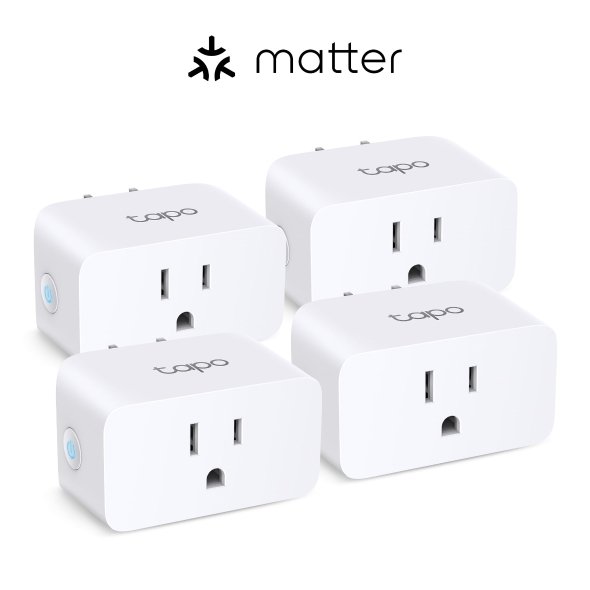
Best Overall: TP-Link Tapo P110M
Price: ~S$18–22 | Protocol: Matter over Wi-Fi | Max Load: 13A / 2990W | Energy Monitoring: Yes (via Tapo app)
The Tapo P110M is the smart plug I’d recommend to most Singapore homeowners. It’s absurdly affordable, Matter-certified, and has genuinely useful energy monitoring built in.
Setup takes about two minutes: the Tapo app discovers the plug via Bluetooth, connects it to your 2.4GHz Wi-Fi, and you’re done. Because it supports Matter, you can also add it directly to Apple Home, Google Home, or SmartThings without ever touching the Tapo app.
The energy monitoring is where this plug earns its keep. The Tapo app breaks down power consumption by day, week, and month, and you can export the data if you’re the spreadsheet type. Plug your SP Group tariff rate in (29.72 cents per kWh for Q2 2026), and it’ll show you exactly how much that old standing fan or desktop PC costs per month. A mini fridge drawing 45W continuously works out to roughly S$9.60 per month at current rates. Knowledge is power.
The P110M is compact enough that two of them fit side by side on a standard Singapore double wall plate without blocking each other. At 13A and 2990W, it handles everything short of your aircon compressor.
The catch: It’s Wi-Fi only, so it won’t strengthen a Thread mesh network. And energy monitoring data is only available through the Tapo app — the Matter standard doesn’t support energy reporting yet, so Apple Home and Google Home can only turn it on and off.
Buy it if: You want the best value smart plug with energy monitoring in Singapore.
Best for Privacy and Thread Mesh: Eve Energy
Price: ~S$55–65 | Protocol: Matter over Thread | Max Load: 13A / 2900W | Energy Monitoring: Yes (via Eve app)
The Eve Energy is the premium pick for Singapore homeowners who care about privacy and want to build a Thread mesh network. It’s available right now from the Apple Singapore online store.
What makes the Eve Energy special is Thread. Unlike Wi-Fi plugs that talk to your router, the Eve Energy communicates via Thread — a low-power mesh protocol where every device acts as a router, strengthening the network for other Thread devices. If you’ve got Aqara Thread sensors, Nanoleaf Thread bulbs, or an Apple TV 4K as your Thread border router, each Eve Energy plug you add makes the whole mesh more resilient. In an HDB with thick concrete walls between rooms, that mesh reliability matters.
Privacy is Eve’s other selling point. There’s no Eve cloud, no account registration, and no data collection. Everything runs locally on your Thread network. Your energy data stays on your phone, period.
The Eve app provides detailed energy monitoring with real-time wattage, historical consumption graphs, and cost projections based on your electricity rate.
The catch: At roughly three times the price of a Tapo P110M, it’s a significant investment. You’ll also need a Thread border router (Apple TV 4K, HomePod, or a compatible hub like the Aqara M3) to use it.
Buy it if: You’re building a Thread smart home, value privacy, and want every plug to double as a mesh router.
Best Budget Matter Option: Meross MSS315 (UK Version)
Price: ~S$22–28 | Protocol: Matter over Wi-Fi | Max Load: 13A | Energy Monitoring: Yes (via Meross app)
Meross has been quietly making some of the most reliable smart plugs on the market, and the MSS315 UK version brings Matter certification and energy monitoring to a Type G form factor at a very competitive price.
The MSS315 supports Matter over Wi-Fi, so it works with Apple Home, Google Home, Alexa, and SmartThings out of the box. The Meross app provides real-time power monitoring, historical data, and the ability to set schedules and timers. There’s even a clever “production mode” if you have a balcony solar setup — it tracks how much energy you’re feeding back into the grid.
Build quality is solid with flame-retardant PC material, and the compact design won’t block your second socket. Setup is straightforward: scan the Matter QR code with your preferred smart home app, or use Bluetooth pairing through the Meross app.
The catch: Wi-Fi only (no Thread), and the Meross app isn’t as polished as the Tapo or Eve apps.
Buy it if: You want a reliable, affordable Matter plug with energy monitoring and don’t mind a less refined app experience.
For Aqara Ecosystem Users: Aqara Smart Plug
Price: ~S$25–35 | Protocol: Zigbee 3.0 (via Aqara Hub) | Max Load: 10A / 2300W | Energy Monitoring: Yes
If you’re already running Aqara hubs and sensors in your HDB — and many Singapore smart home enthusiasts are — the Aqara Smart Plug is a natural fit. It connects via Zigbee 3.0 through your existing Aqara hub (M2, M3, or M200), so it doesn’t add another device to your Wi-Fi network.
Energy monitoring through the Aqara Home app shows real-time power consumption and historical data. You can set power-based automations — for example, trigger an alert if a device draws more wattage than expected, which is handy for catching appliance faults early.
Through an Aqara hub with Matter bridge support (like the M3 or M200), the plug is exposed to Matter, giving you cross-platform control even though it’s natively Zigbee. If you’ve already bridged your Zigbee devices to Matter, this plug slots right in.
The catch: Requires an Aqara hub. The 10A rating is lower than the UK-spec plugs above, so skip it for high-draw appliances like kettles.
Buy it if: You’re already in the Aqara ecosystem and want energy monitoring without adding more Wi-Fi devices. Available from HomeSmart Singapore and Aqara Singapore (PFE Tech).
How to Actually Save Money with Energy Monitoring
Buying a smart plug is step one. Here’s how to turn that data into real savings on your SP bill.
Hunt the Vampire Loads
Plug your TV, gaming console, desktop PC, and other electronics into smart plugs. You’ll probably find 5–15W of standby draw per device. Across 8–10 devices, that’s 40–150W being wasted 24/7 — roughly S$8–32 per month at current SP Group rates. Set up schedules to cut power during sleeping hours, or create a “goodnight” automation to kill everything at once.
Monitor Your Appliance Health
Smart plugs with energy monitoring double as diagnostic tools. A washing machine that suddenly draws 50% more wattage might have a failing motor. A fridge that stops drawing power means the compressor died. These early warnings can save you from more expensive problems down the line.
Pair with Singapore’s Smart Meter Rollout
SP Group is rolling out smart meters across Singapore, giving you 30-minute interval consumption data. Combine that macro view with plug-level monitoring for a complete picture of where every cent goes. We covered this in detail in our guide to slashing your energy bills with Singapore’s smart meter rollout.
Identify Your Biggest Energy Hogs
Move your smart plug between appliances over a week to build a consumption map of your home. Common Singapore surprises: the water dispenser (80–120W continuous), the old TV in the spare room (150W or more when on), and multiple phone and tablet chargers left plugged in (3–5W each, but they add up).
Quick Comparison
| Tapo P110M | Eve Energy | Meross MSS315 | Aqara Smart Plug | |
|---|---|---|---|---|
| Price (SGD) | ~S$18–22 | ~S$55–65 | ~S$22–28 | ~S$25–35 |
| Protocol | Matter/Wi-Fi | Matter/Thread | Matter/Wi-Fi | Zigbee (Matter via hub) |
| Max Load | 13A/2990W | 13A/2900W | 13A | 10A/2300W |
| Energy Monitoring | Tapo app | Eve app | Meross app | Aqara app |
| Thread Mesh | No | Yes | No | No |
| Needs Hub | No | Thread border router | No | Aqara hub |
| Best For | Most people | Apple/Thread users | Budget Matter | Aqara users |
The Verdict
For most Singapore HDB and condo owners, the TP-Link Tapo P110M is the smart buy. At under S$22 per plug, you can outfit your whole home without flinching, and the energy monitoring alone will likely pay for itself within a few months once you discover — and eliminate — those hidden vampire loads.
If you’re building a Thread-based smart home or you’re deep in the Apple ecosystem, the Eve Energy is worth the premium. Every plug strengthens your mesh network, and the zero-cloud approach means your energy data stays yours.
And if you’re already running Aqara gear from HomeSmart Singapore or PFE Tech, the Aqara Smart Plug keeps everything in one ecosystem without adding more Wi-Fi devices to your network.
Whatever you choose, the real value isn’t the plug itself — it’s the visibility into where your electricity actually goes. With SP Group rates climbing quarter over quarter, that visibility is worth more than ever.