There is a specific kind of smart home problem that eats entire weekends in Singapore flats. The Matter-over-Thread lock on your front door works perfectly for three weeks, then goes “No Response” every evening around dinner time. The presence sensor in the household shelter reports state changes ten seconds late. A Thread bulb at the far end of the flat pairs fine, then quietly stops responding after you move a HomePod mini to another room.
You can’t see any of it. Thread is a self-organising mesh, and until now the mesh organised itself entirely in the dark. You guessed. You moved things. You re-paired. You guessed again.
Home Assistant 2026.9, released on 2 September 2026, finally turns the lights on. The headline feature is a Matter network map — an actual topology diagram of every Matter device in your home, Thread and Wi-Fi together, with the border routers and access points they hang off. Zigbee, Z-Wave and Bluetooth already had network maps in Home Assistant. Matter was the conspicuous gap, and the Open Home Foundation roadmap called it out as exactly that.
This is a bigger deal in a Singapore flat than it is almost anywhere else, and it’s worth understanding why before you go looking at your own map.
What 2026.9 actually added
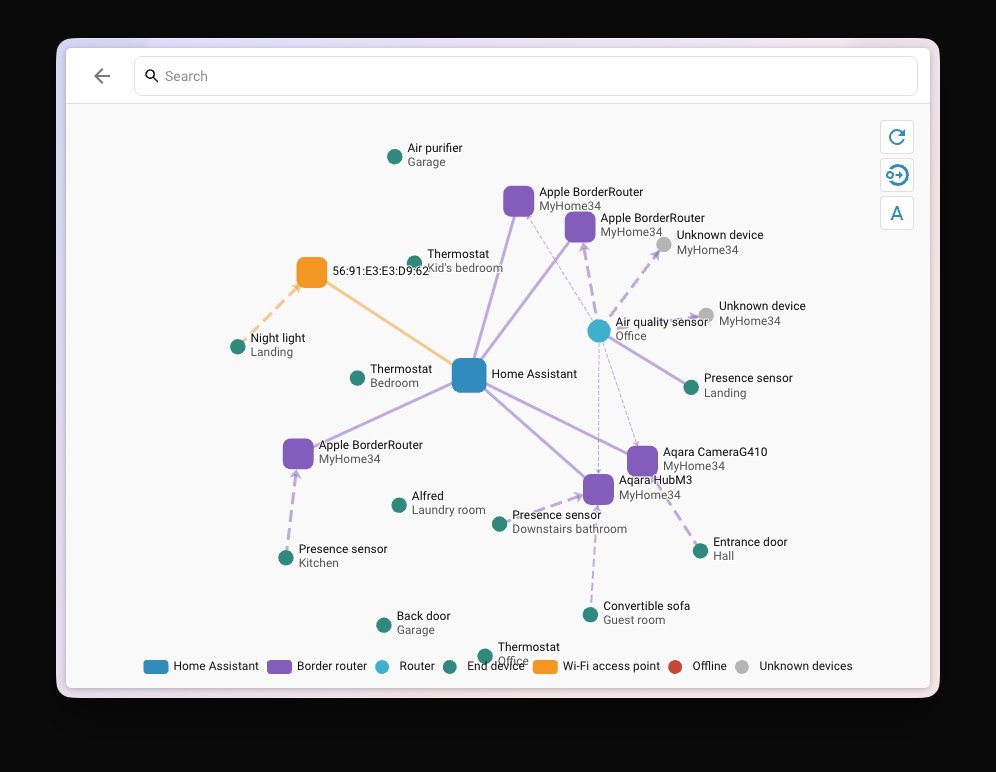
Straight from the release notes, the Matter panel now carries a Show map button. What it draws:
- Matter-over-Thread and Matter-over-Wi-Fi devices in one view — not two separate diagrams. If half your lights are Wi-Fi and half are Thread, you finally see both against the same infrastructure.
- Thread border routers and Wi-Fi access points as nodes, labelled with recognisable names — hostnames and SSIDs where they’re available, not raw MAC addresses or 16-digit node IDs.
- Thread roles per device. A Thread device is either a router (mains-powered, relays traffic for others) or an end device (usually battery-powered, talks to exactly one parent and sleeps the rest of the time). The map tells you which is which.
- Link styling that carries information. Colour indicates the transport — Thread versus Wi-Fi. Thickness and direction reflect signal strength, and crucially it shows strength from each side of the link, which is how you catch the asymmetric links that cause intermittent drop-outs.
- The full path from Home Assistant to each device. Not just “connected”, but connected through what.
One caveat worth knowing before you go hunting for the button: the map needs a current Matter Server. If you’re on an older one, Home Assistant tells you to update rather than rendering a half-broken diagram. Update the Matter Server add-on first, then look.
The rest of 2026.9 is solid but less structural — an Active alerts section on the security dashboard that only appears when something needs attention, a Favorites pin list, an Activity detail view that traces what triggered what down to millisecond timestamps, a shared Sources filter across History and Activity, and 13 new integrations. Check the breaking changes before you update: battery_level is gone from vacuum entities, LLM tool names are now prefixed with the integration domain, and installing updates now requires an administrator account.
Why this matters more in an HDB than in a semi-detached
Thread is a 2.4 GHz mesh built on IEEE 802.15.4. It is low-power by design, which is another way of saying it is not powerful. It routes around obstacles by hopping between mains-powered devices. That model works beautifully in a timber-framed house in Portland. It works considerably less beautifully here.
Singapore flats are cast concrete with brick or block internal partitions, and they have one feature most homes on earth don’t: the household shelter. The Civil Defence Shelter Act 1997 made them compulsory in new flats and houses, so anything built from the late 1990s onward has one, and it is a steel-reinforced concrete box — BCA’s household shelter requirements specify a minimum 300 mm top slab — sitting somewhere near the middle of your floor plan. People use them as store rooms, pantries, server closets. Whatever you put in there, RF does not politely pass through it.
Add the typical HDB geometry — a long thin 4-room or 5-room layout where the master bedroom is at one end and the kitchen and service yard at the other, with the shelter in between — and you have a floor plan that is almost designed to split a Thread mesh into two halves that can’t see each other.
We covered how to build a Thread mesh that survives concrete walls in principle. The map is what lets you check whether you actually managed it.
Four things to look for on your own map
Open Settings → Devices & services → Matter, hit Show map, and work through these in order.
1. Islands — are you running more than one Thread network?
This is the single most common problem and the one the map exposes fastest. Apple, Google and Home Assistant each form their own Thread network when you first start using their products. Different credentials, different PAN IDs, no roaming between them. The Home Assistant Thread documentation is explicit about this: you can end up with three separate meshes coexisting in one flat, each thin and fragile, none of them helping the others.
On the map this shows as disconnected clusters. Three small islands instead of one dense web.
The fix is to import Thread credentials from the existing Apple or Google network using the companion apps, set that network as preferred, and then join Home Assistant’s own border router to it. What you want is one network with several border routers on it — that’s the “dense mesh” configuration, and it’s the single biggest reliability upgrade available to most people, at zero cost.
Do check the information icon next to each network on the Thread config page — it tells you whether Home Assistant actually holds credentials for that network or is merely aware it exists. Also worth knowing: the preferred-network setting isn’t fully implemented yet, and when you add a device via a vendor’s companion app, the phone’s preferred network wins, not Home Assistant’s. So commission new Thread devices deliberately.
2. Everything hanging off one border router
If every Thread node on the map traces back through a single border router, you have a single point of failure and, more practically, a congestion point. Thread routers have finite child capacity. A border router in the living room TV console serving a lock at the front door, sensors in both bedrooms and a leak sensor under the kitchen sink is doing too much through too much concrete.
3. Battery end devices sitting at the edge
Look for end-device nodes with one thin link to a distant parent. Battery sensors can’t relay for anyone — they’re leaves, always. A leaf whose only parent is three rooms away is the node that will drop out first, and it’s the classic profile of the door sensor or presence sensor that works “most of the time.”
The fix is rarely to move the sensor. It’s to give it a closer parent: put a mains-powered Thread router-role device between it and the rest of the mesh. Thread-mode smart lights, plugs and switches are ideal for this because they’re already where you need them. This is exactly the argument for running Aqara’s new dual-protocol lights in Thread mode rather than Zigbee — every ceiling light becomes a mesh repeater. Same logic applies to Philips Hue’s move to concurrent Thread.
4. Devices you thought were Thread but aren’t
Because the map shows Wi-Fi and Thread together, you’ll almost certainly find at least one device you’d mentally filed under “Thread” sitting on Wi-Fi, connected to an access point. That’s not necessarily bad — but it changes the diagnosis completely. A Wi-Fi Matter device that keeps dropping is an access point and network segmentation problem, not a mesh problem, and no amount of adding Thread border routers will fix it.
The Singapore border router shopping list
If the map says you need more border routers, here’s what’s actually worth buying locally — and one expensive trap.
The trap first. Apple TV 4K is a Thread border router — but only the 128 GB Wi-Fi + Ethernet model. The 64 GB Wi-Fi-only version has no Thread radio at all; it’s a Matter controller over Wi-Fi and nothing more. On Apple’s Singapore store that’s S$379 versus S$299, and if you buy the cheaper one for smart home reasons you have bought the wrong box. Note also that Apple’s September 2026 event came and went with no new Apple TV or HomePod, so this is still the current lineup.
The cheapest sane border router is the HomePod mini at S$179 from Apple SG or locally via HomeSmart Singapore. It has a Thread radio, it’s mains-powered, it’s small enough to put in a bedroom, and it doubles as a speaker. For most Apple Home households, two or three HomePod minis distributed across the flat is the correct answer and it beats any single expensive hub.
If you’re not in Apple’s ecosystem, the Aqara Hub M3 at S$289 is the most useful single box on the Singapore market: Thread border router, Zigbee coordinator, Matter controller and Matter bridge, plus an IR blaster and PoE. That combination matters here because so many Singapore smart homes are half Zigbee already — the M3 bridges the old stuff into Matter while also extending the Thread mesh. Aqara has confirmed it plays nicely alongside other border routers on a shared Thread network, provided the network name and PAN ID actually match. If they don’t, you get the isolated-islands problem from point 1. HomeSmart’s Matter compatibility guide is a reasonable sanity check on what currently works with what.
Google households have it harder in Singapore. Nest Wifi Pro, Nest Hub (2nd gen), Nest Hub Max and the Google TV Streamer are all border routers, and the new Google Home Speaker that shipped 25 June 2026 at US$99 includes a Thread 1.3 border router — but Google’s home hardware has never had reliable first-party retail distribution here. Note that Nest Mini and Nest Audio are not border routers; they’re Wi-Fi-only Matter hubs with no 802.15.4 radio, which surprises a lot of people.
Running Home Assistant on your own hardware? A Home Assistant Connect ZBT-2 (about US$49) plus the OpenThread Border Router add-on turns your Home Assistant box into a border router. One important limitation: the ZBT-2 does Zigbee or Thread, not both simultaneously. If you need both radios you need two dongles — and if you’re still sizing your Home Assistant hardware, our current hardware guide covers what the memory price spike has done to the usual recommendations.
What the map won’t do
Manage expectations. It’s a topology snapshot, not a time machine.
- It only shows Matter. Your Zigbee devices have their own map, and anything running on a vendor cloud — most PRISM+ gear, most Tuya-based devices — appears nowhere at all.
- There’s no history. You see the mesh as it is right now, not as it was at 8pm last night when the lock dropped. Thread topology reshuffles on its own; take a screenshot before and after every change.
- Signal strength is not the whole story. A link can look healthy and still be sitting in the path of a 2.4 GHz Wi-Fi channel that your neighbour’s router is hammering. Thread and Wi-Fi share the 2.4 GHz band, and in an HDB block you have a lot of neighbours.
- It won’t tell you what to do. It tells you what’s true. The reading is still yours.
The bottom line
This is the most useful thing to happen to Matter troubleshooting in Singapore homes all year, and it costs nothing. If you run Home Assistant, update to 2026.9, update the Matter Server add-on, and go look at the map before you buy another piece of hardware.
Most people will find one of two things. Either they’re running two or three separate Thread networks that they can merge for free, or they have a mesh that’s genuinely too thin for a concrete flat and needs one more mains-powered node in the right place. Both are cheap fixes. Neither was findable before September.
The guessing part is over. That’s worth an evening.